Zero-Downtime Laravel Deploys to a VPS with GitHub Actions
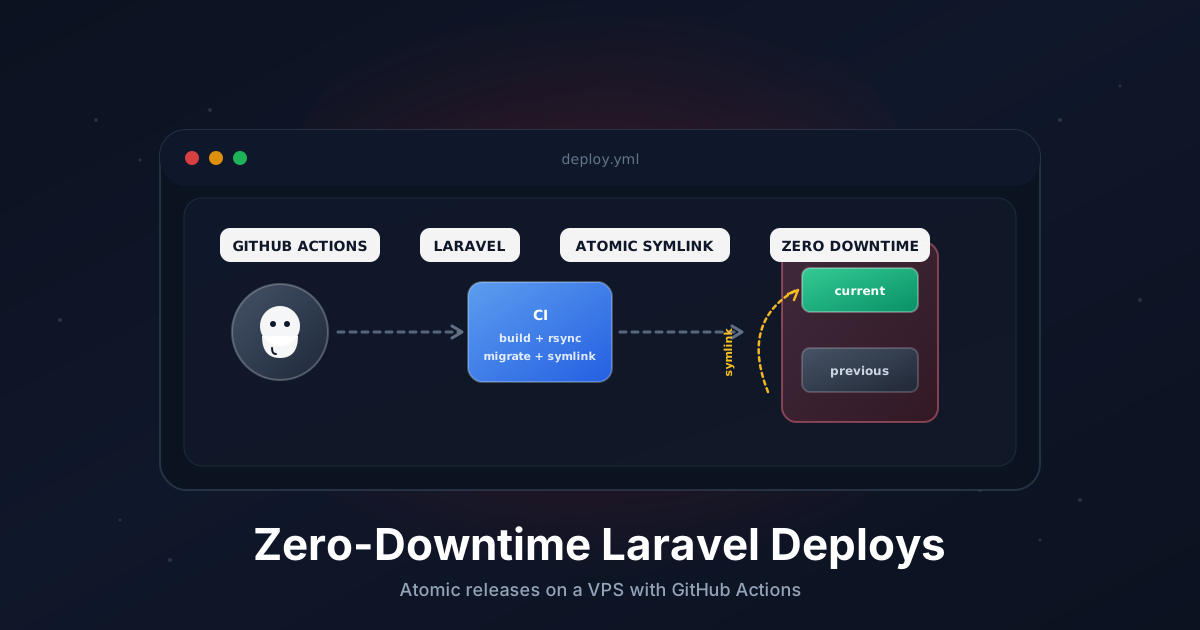
The classic git pull && composer install && php artisan migrate deploy works until it doesn't. Half the requests hit the new code, half the old one. A failed composer install leaves you with a broken vendor/ folder. A bad migration locks the table you were trying to update. And if you want to roll back, you're scrambling to remember which commit was deployed last.
The Capistrano-style atomic-symlink layout fixes all of that. Each deploy lands in a fresh, timestamped directory. Once it's fully built and ready, a single symlink swap makes it live. Nothing in flight breaks. Rollback is one command.
This guide walks through doing it on a plain Ubuntu VPS with GitHub Actions, no paid services involved.
TL;DR
- Build each release in
/var/www/app/releases/<timestamp>/and never touch the live one until it's ready. - A
currentsymlink points to the active release. Swapping it is the deploy. .env,storage/, andpublic/uploads/live in/var/www/app/shared/and get symlinked into every release.- GitHub Actions handles checkout, asset build, rsync to the server, and the final swap.
- Rollback is
ln -sfn releases/<previous> currentfollowed by an FPM reload.
What You Need
- A Laravel app pushed to GitHub.
- A VPS with SSH access (Ubuntu 22.04 or 24.04 in this guide).
- PHP 8.3 with
php-fpm, plus Caddy or Nginx in front. - Composer, Node, and the usual Laravel extensions installed on the server (or build assets in CI and rsync them, which is what we'll do).
- Supervisor for queue workers if you run them. We'll restart them at the end of each deploy.
If your stack is missing pieces, install them first. The deploy script assumes they exist.
Step 1: The Directory Layout
Pick a base directory and stick to it. The whole strategy depends on this shape:
/var/www/app/
├── current -> releases/20260502143000     # symlink to active release
├── releases/
│   ├── 20260430112200/                    # old release (kept for rollback)
│   ├── 20260501090400/                    # previous release
│   └── 20260502143000/                    # current release
└── shared/
    ├── .env                               # one .env, symlinked into every release
    ├── storage/                           # logs, cache, sessions, uploads
    └── public/uploads/                    # user-uploaded files
Every release directory is a complete, self-contained Laravel app. The pieces that have to survive across deploys (env config, logs, user uploads) live in shared/ and get symlinked in.
Create the layout once, by hand:
sudo mkdir -p /var/www/app/{releases,shared/storage,shared/public/uploads}
sudo chown -R deploy:www-data /var/www/app
sudo chmod -R 775 /var/www/app/shared
Copy your existing .env into /var/www/app/shared/.env. We'll wire up the symlinks in the deploy script.
Step 2: SSH Key Setup
GitHub Actions needs a way to log in to your server. You generate an SSH key, put the public half on the VPS, and store the private half as a GitHub Actions secret.
On your local machine (or any machine, the key is just a file):
ssh-keygen -t ed25519 -f ./deploy_key -N "" -C "github-actions"
That gives you deploy_key (private) and deploy_key.pub (public).
On the VPS, create a deploy user and add the public key:
sudo adduser --disabled-password --gecos "" deploy
sudo usermod -aG www-data deploy
sudo mkdir -p /home/deploy/.ssh
sudo chmod 700 /home/deploy/.ssh
echo "PASTE_CONTENTS_OF_deploy_key.pub_HERE" | sudo tee /home/deploy/.ssh/authorized_keys
sudo chmod 600 /home/deploy/.ssh/authorized_keys
sudo chown -R deploy:deploy /home/deploy/.ssh
Give the deploy user passwordless sudo only for the FPM reload command. Run sudo visudo and add:
deploy ALL=(ALL) NOPASSWD: /bin/systemctl reload php8.3-fpm, /bin/systemctl restart laravel-worker.service
That's the principle of least privilege. The deploy user can reload PHP-FPM and bounce queue workers, nothing else.
Back in GitHub, go to your repo → Settings → Secrets and variables → Actions and add:
SSH_PRIVATE_KEY: the contents ofdeploy_key(the private one)SSH_HOST: your server's IP or hostnameSSH_USER:deploySSH_KNOWN_HOSTS: output ofssh-keyscan your.server.com(run that locally, paste the result)
Delete the local deploy_key once you've stored it. You don't need it again.
Step 3: The GitHub Actions Workflow
Create .github/workflows/deploy.yml. This runs on every push to main, builds the release in CI, ships it to the server, and swaps the symlink.
name: Deploy

on:
  push:
    branches: [main]
  workflow_dispatch:

concurrency:
  group: deploy-production
  cancel-in-progress: false

jobs:
  deploy:
    runs-on: ubuntu-latest
    timeout-minutes: 15

    env:
      DEPLOY_PATH: /var/www/app
      RELEASE: ${{ github.run_id }}-${{ github.sha }}

    steps:
      - name: Checkout
        uses: actions/checkout@v4

      - name: Set up PHP
        uses: shivammathur/setup-php@v2
        with:
          php-version: '8.3'
          extensions: mbstring, intl, pdo_mysql, redis, bcmath, zip
          coverage: none
          tools: composer:v2

      - name: Set up Node
        uses: actions/setup-node@v4
        with:
          node-version: '20'
          cache: 'npm'

      - name: Install PHP dependencies
        run: composer install --no-dev --no-interaction --prefer-dist --optimize-autoloader

      - name: Install Node dependencies
        run: npm ci

      - name: Build assets
        run: npm run build

      - name: Strip dev artifacts
        run: |
          rm -rf node_modules tests .git .github .editorconfig phpunit.xml
          mkdir -p storage/framework/{cache,sessions,views} bootstrap/cache

      - name: Add SSH key
        run: |
          mkdir -p ~/.ssh
          echo "${{ secrets.SSH_PRIVATE_KEY }}" > ~/.ssh/id_ed25519
          chmod 600 ~/.ssh/id_ed25519
          echo "${{ secrets.SSH_KNOWN_HOSTS }}" > ~/.ssh/known_hosts

      - name: Rsync release to server
        run: |
          ssh ${{ secrets.SSH_USER }}@${{ secrets.SSH_HOST }} \
            "mkdir -p ${{ env.DEPLOY_PATH }}/releases/${{ env.RELEASE }}"
          rsync -az --delete \
            --exclude='.env' \
            --exclude='storage' \
            --exclude='public/uploads' \
            ./ ${{ secrets.SSH_USER }}@${{ secrets.SSH_HOST }}:${{ env.DEPLOY_PATH }}/releases/${{ env.RELEASE }}/

      - name: Activate release
        run: |
          ssh ${{ secrets.SSH_USER }}@${{ secrets.SSH_HOST }} \
            "DEPLOY_PATH=${{ env.DEPLOY_PATH }} RELEASE=${{ env.RELEASE }} bash -s" < scripts/deploy.sh
A few things worth pointing out:
concurrencyblocks two deploys from running at the same time. If a second push lands while the first is mid-deploy, it queues.- The build happens entirely on the GitHub runner. The server never runs
composerornpm. This keeps deploys fast and removes the need for build tooling on the VPS. --exclude='.env'and friends in thersynckeep us from clobbering the shared files.- The actual server-side work lives in
scripts/deploy.sh, which we pipe in over SSH. Keeping it in the repo means it's versioned alongside the workflow.
Step 4: The Server-Side Deploy Script
Create scripts/deploy.sh in your repo. This runs on the server after the rsync.
#!/usr/bin/env bash
set -euo pipefail

DEPLOY_PATH="${DEPLOY_PATH:-/var/www/app}"
RELEASE="${RELEASE:?RELEASE must be set}"
RELEASE_DIR="$DEPLOY_PATH/releases/$RELEASE"
SHARED_DIR="$DEPLOY_PATH/shared"
CURRENT_LINK="$DEPLOY_PATH/current"

echo "Linking shared files into release..."
ln -sfn "$SHARED_DIR/.env" "$RELEASE_DIR/.env"
rm -rf "$RELEASE_DIR/storage"
ln -sfn "$SHARED_DIR/storage" "$RELEASE_DIR/storage"
mkdir -p "$RELEASE_DIR/public"
rm -rf "$RELEASE_DIR/public/uploads"
ln -sfn "$SHARED_DIR/public/uploads" "$RELEASE_DIR/public/uploads"

echo "Setting permissions..."
chmod -R 775 "$RELEASE_DIR/bootstrap/cache" || true

echo "Running migrations..."
php "$RELEASE_DIR/artisan" migrate --force --no-interaction

echo "Caching config and routes..."
php "$RELEASE_DIR/artisan" config:cache
php "$RELEASE_DIR/artisan" route:cache
php "$RELEASE_DIR/artisan" view:cache
php "$RELEASE_DIR/artisan" event:cache

echo "Swapping symlink..."
ln -sfn "$RELEASE_DIR" "$CURRENT_LINK.new"
mv -Tf "$CURRENT_LINK.new" "$CURRENT_LINK"

echo "Reloading php-fpm..."
sudo /bin/systemctl reload php8.3-fpm

echo "Restarting queue workers..."
php "$CURRENT_LINK/artisan" queue:restart
sudo /bin/systemctl restart laravel-worker.service || true

echo "Pruning old releases..."
cd "$DEPLOY_PATH/releases"
ls -1t | tail -n +6 | xargs -r rm -rf

echo "Deploy $RELEASE complete."
The key trick is ln -sfn current.new followed by mv -Tf current.new current. mv on Linux is atomic for symlinks within the same filesystem. There is no moment where current doesn't exist. Requests in flight finish on the old release; new requests land on the new one.
Pruning keeps the last 5 releases. Bump that number if you want a longer rollback window. Disk is cheap, but a Laravel app with node_modules stripped and assets built is usually 50 to 200 MB.
Step 5: The Web Server Config
Both Caddy and Nginx need to serve from the symlink, not a fixed release.
Caddy
/etc/caddy/Caddyfile:
app.example.com {
    root * /var/www/app/current/public
    encode zstd gzip
    php_fastcgi unix//run/php/php8.3-fpm.sock
    file_server

    log {
        output file /var/log/caddy/app.log
    }
}
Nginx
/etc/nginx/sites-available/app:
server {
    listen 80;
    server_name app.example.com;

    root /var/www/app/current/public;
    index index.php;

    location / {
        try_files $uri $uri/ /index.php?$query_string;
    }

    location ~ \.php$ {
        fastcgi_pass unix:/run/php/php8.3-fpm.sock;
        fastcgi_split_path_info ^(.+\.php)(/.+)$;
        include fastcgi_params;
        fastcgi_param SCRIPT_FILENAME $realpath_root$fastcgi_script_name;
        fastcgi_param DOCUMENT_ROOT $realpath_root;
    }

    location ~ /\.(?!well-known).* {
        deny all;
    }
}
Note $realpath_root instead of $document_root. Without it, Nginx hands FPM the symlink path, and FPM resolves it once and caches the resolved path. Your "atomic" deploy would no-op until FPM was restarted. With $realpath_root, the resolved path goes to FPM on every request and the symlink swap actually takes effect.
Even with that fix, FPM caches opcode for the resolved files. Reloading FPM at the end of the deploy script clears that cache. That's why we run systemctl reload php8.3-fpm.
Step 6: The Queue Worker (Supervisor)
If you run php artisan queue:work, it needs to live under Supervisor or a systemd unit so it restarts on its own and on deploy.
/etc/supervisor/conf.d/laravel-worker.conf:
[program:laravel-worker]
process_name=%(program_name)s_%(process_num)02d
command=php /var/www/app/current/artisan queue:work --sleep=3 --tries=3 --max-time=3600
autostart=true
autorestart=true
user=deploy
numprocs=2
redirect_stderr=true
stdout_logfile=/var/log/laravel-worker.log
stopwaitsecs=3600
Reload Supervisor after dropping that in:
sudo supervisorctl reread
sudo supervisorctl update
sudo supervisorctl start laravel-worker:*
If you prefer systemd over Supervisor, a small unit file does the same job. The deploy script already calls systemctl restart laravel-worker.service for that path.
Step 7: Rolling Back
The whole point of this layout is that rollback is trivial. SSH into the server and run:
cd /var/www/app
ln -sfn releases/$(ls -1t releases | sed -n '2p') current && sudo systemctl reload php8.3-fpm
That picks the second-most-recent release (the one before the current one) and points current at it. Reload FPM, you're back on the old code. The whole thing takes under a second.
If you want to be explicit, list the releases and pick one by name:
ls -1t /var/www/app/releases
ln -sfn /var/www/app/releases/20260501090400 /var/www/app/current
sudo systemctl reload php8.3-fpm
Worth knowing: rollback does not undo migrations. If your bad release ran a destructive migration, you've got a separate problem. We'll cover that in "Going Further" below.
Troubleshooting
502 Bad Gateway right after deploy. PHP-FPM cached the resolved path of the old release and is now pointing at files that have been pruned. Make sure your Nginx config uses $realpath_root and that the deploy script reloads FPM. Run sudo systemctl reload php8.3-fpm manually to confirm it clears.
Permission denied on storage/logs/laravel.log. The shared storage directory needs to be writable by the user PHP-FPM runs as (usually www-data). Fix with sudo chown -R deploy:www-data /var/www/app/shared/storage && sudo chmod -R 775 /var/www/app/shared/storage. Set the umask in Supervisor or systemd to 002 if newly written files keep landing with the wrong group.
OPcache serving stale code. Either you didn't reload FPM, or opcache.validate_timestamps=0 is set and the reload isn't reaching the right pool. Confirm with sudo systemctl status php8.3-fpm and check the timestamp on the last reload. As a sanity check, opcache_reset() from a one-off endpoint flushes everything.
Queue workers running old code. They boot the framework once and stay alive. php artisan queue:restart only flags them to exit, it doesn't kill them. They exit after their current job. If your jobs are long-running, give them time, or restart Supervisor directly: sudo supervisorctl restart laravel-worker:*.
composer install fails on the runner with memory errors. Bump the runner to ubuntu-latest-large, or split the steps so composer dump-autoload --optimize runs separately. On free runners, very large dependency trees occasionally hit the 7 GB limit.
Going Further
Forge, Envoyer, and Deployer. All three implement this same atomic-release shape. Laravel Forge provisions the server too, Envoyer focuses purely on zero-downtime deploys, and Deployer is an open-source PHP CLI that does the same job with a deploy.php instead of YAML. If you'd rather click a button than maintain a workflow file, those are the move. The shape we built here is exactly what they automate.
Blue-green deploys. Two full app instances behind a load balancer, deploy to the inactive one, switch traffic. The atomic-symlink pattern is essentially blue-green on a single box. For multi-server setups, a load balancer plus a feature flag on traffic routing gets you full blue-green without much extra plumbing.
DB-safe migration patterns. Atomic releases solve code rollback, not database rollback. The fix is to write expand-then-contract migrations: deploy 1 adds the new column nullable and starts dual-writing, deploy 2 backfills, deploy 3 starts reading from the new column, deploy 4 drops the old one. Slower, but every step is reversible. For destructive changes, take a snapshot before deploying and document the rollback path.
Healthchecks before symlink swap. Add a step in the deploy script that hits /health on the new release (via a dedicated FPM pool) before swapping. If the healthcheck fails, abort the deploy and leave the old release live. Five extra lines of bash, saves you from shipping a broken build.
Running Laravel on a VPS and want a fast, predictable host to deploy onto? Our plans run NVMe storage with PHP, Composer, and Node preinstalled. See pricing.